
📚 English Tests, ✍🏻 IELTS
Free IELTS Mock Tests: 8 Sites and My Computer Test Tips (2026)
Updated 2026/10/16
Jason’s Memo
IELTS in Taiwan is now computer-delivered only, so use online mock tests before exam day to get used to the question types and the computer interface.
- Learn the question types: the official IELTS site and IDP Taiwan both have free official practice questions. Start with those.
- Simulate the computer test: IELTS Online Tests has an interface close to the real computer test and scores your listening and reading.
- Work on weak spots: Mini IELTS lets you do listening and reading tests without signing up, and IELTS Bro has a question bank and recalled exam questions.
This post covers the online mock test resources I recommend, plus what I learned taking the computer-delivered test. Since January 31, 2026, IELTS in Taiwan has been computer-only and the paper test is no longer offered. Get familiar with the computer interface before your exam, especially for listening and writing, where it differs most from the paper version.
I’ve also put together a list of 👉🏻 17 free IELTS self-study resources. Use the mock tests together with those resources and you’ll get more out of both.
IELTS changes in 2026: computer-only in Taiwan, and you can retake a single skill
- Computer-only testing: according to the IDP Taiwan announcement, from January 31, 2026 IELTS is offered only as a computer-delivered test, and the paper test is discontinued.
- One Skill Retake: after you take the computer test and receive your results, you can retake one skill within 60 days of your original test date. In Taiwan it costs NT$5,025 (NT$5,400 for IELTS for UKVI). See IDP Taiwan’s One Skill Retake page for the full rules.
- Test dates, fees and locations: check the British Council Taiwan website. The registration system shows the final price.
8 IELTS mock test websites
British Council: good for beginners learning the question types
It has full practice tests for listening, reading, writing and speaking, two sets of each with answers, so beginners can practice questions and learn the formats. It does not simulate the computer test. Every question type opens in a new tab (the three reading sections are three separate tabs), and the passage and questions aren’t shown side by side, so you keep scrolling up and down to find answers. I’d print the pages and practice on paper, because the on-screen experience is poor.
IDP Taiwan free practice tests: in Traditional Chinese, good for learning the computer interface
IDP Taiwan’s prep page is in Traditional Chinese. It collects free practice questions for Academic and General Training, new IELTS practice questions, and an article explaining the features of IELTS on computer, so you can learn the interface and controls ahead of time.
IELTS Online Tests: the most generous site
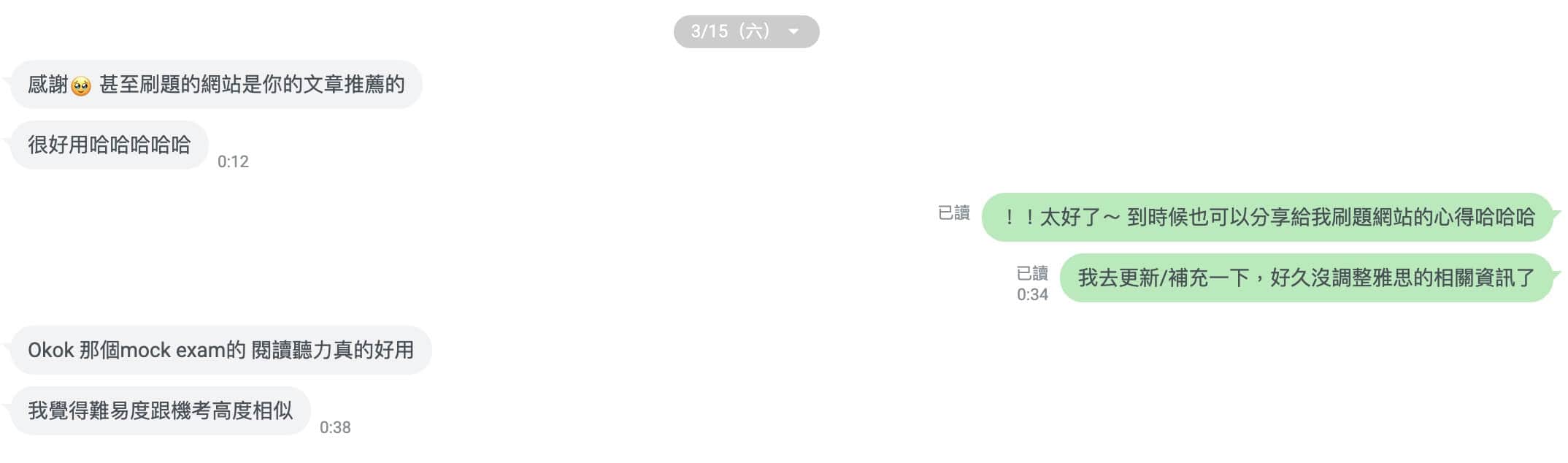
I highly recommend this one. It’s generous and high quality, with a huge number of free mock tests (writing feedback costs extra). There are detailed explanations for reviewing your mistakes, and the controls are intuitive and similar to the real computer-delivered test.
Recently a reader messaged me on their own to say IELTS Online Tests really helped, and that its reading and listening difficulty is very close to the computer test.
Mini IELTS: drill specific question types in listening and reading
This site only offers listening and reading mock tests, with lots of short quizzes. It also has Recent Actual Tests, but the newest listening tests stop at 2022 and reading at 2024. Since the questions are older, it works better for practicing question types.
What I like is that each test lists its question types (matching, multiple choice, T/F/NG and so on), so you can pick the ones you’re weak at and drill them.
Road to IELTS: the British Council’s free trial
The British Council’s Road to IELTS has a free trial called Test Drive, with practice questions and teaching videos from IELTS experts. The full version is paid.
Official IELTS sample questions: both Academic and General Training
The official IELTS website offers free sample questions and answers for Academic and General Training. These are the most accurate source, so do the official questions first and then use other sites for extra practice.
IELTS Bro: well reviewed, with question predictions
Besides online practice, its predicted and recalled exam questions are pretty useful, especially for speaking, where most of the questions end up in its collection. Reviews on Dcard are consistently positive. The site is in Simplified Chinese, and most features are paid.
Official Cambridge sample papers: free download
Cambridge English offers a free zip file of IELTS sample papers that you can download and print. If you want more questions, you can buy the Cambridge IELTS book series.
Where the computer-delivered IELTS helps in each section
Advantages in IELTS Listening
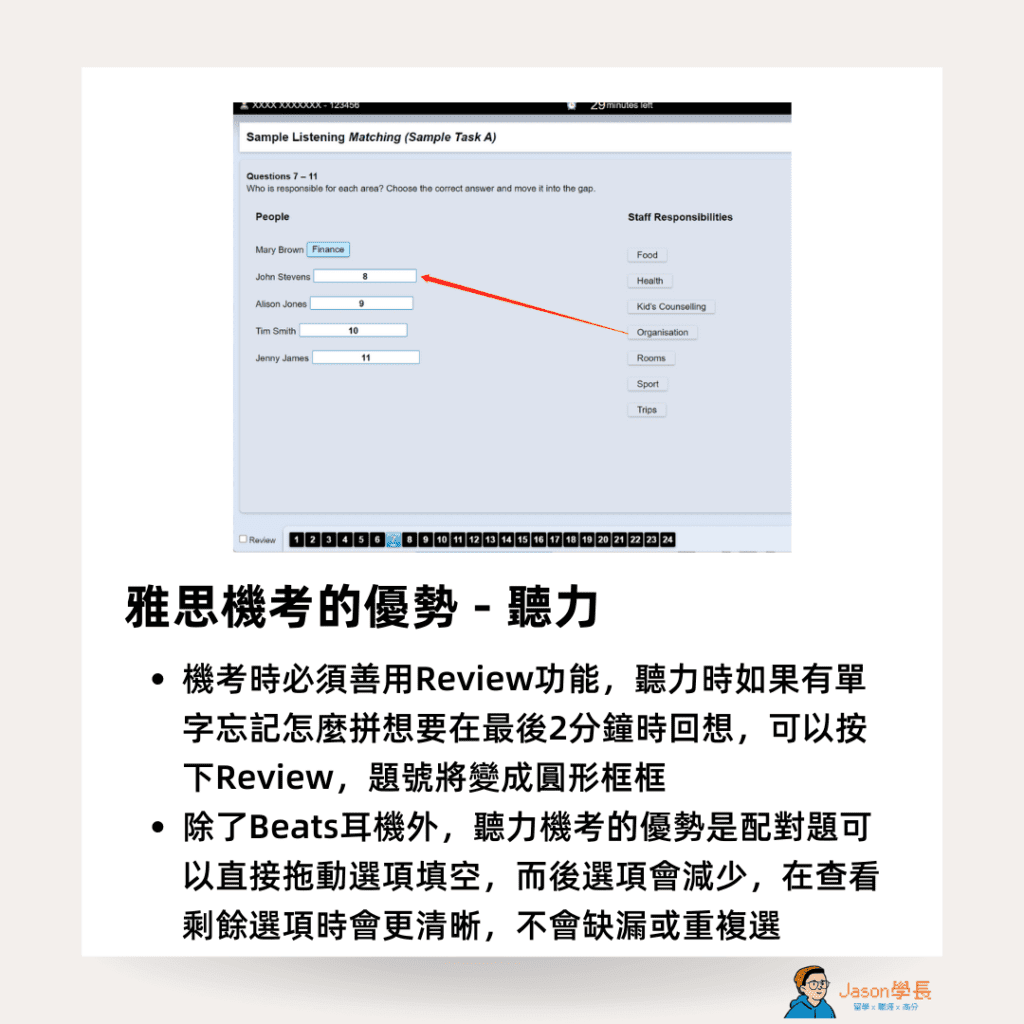
Make good use of the Review function on the computer test. If you forget how to spell a word during listening and want to come back to it in the last 2 minutes, click Review and the question number turns into a circle. Apart from the Beats headphones, the big advantage is that in matching questions you drag options straight into the blanks. Used options disappear, so the remaining ones are easier to see and you won’t miss or repeat any.
Should you write your listening answers on paper first?
The safer approach is to jot down answers to the fill-in-the-blank questions (not matching or multiple choice) and then type them in, in case you run short of time or want to keep the whole conversation fresh in your mind. People disagree on this, though. Go with whatever habit you build during mock tests. Typing answers in directly is also fine.
Advantages in IELTS Reading
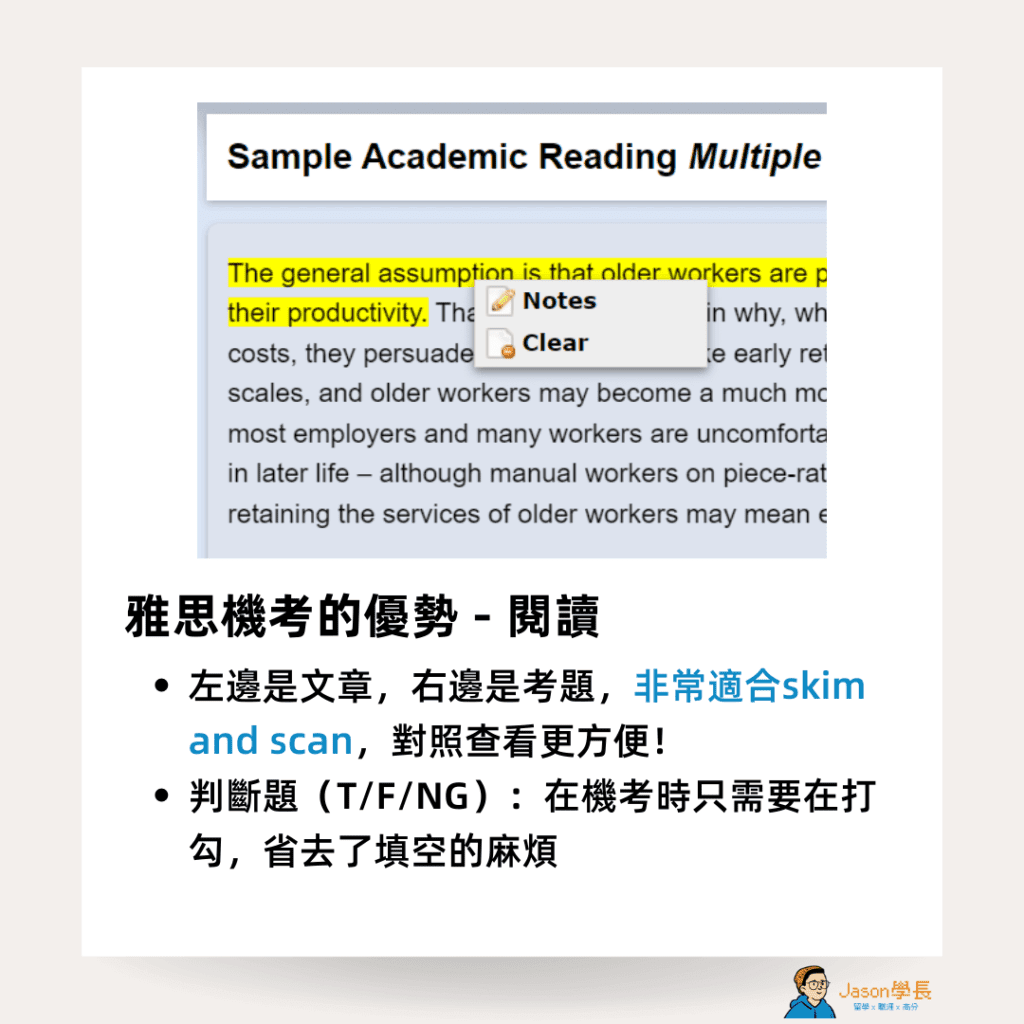
The passage is on the left and the questions are on the right, which suits skimming and scanning and makes cross-checking much easier.
In an earlier post, 👉🏻 my strategy for a Band 9 in IELTS Reading, I explained how much the computer test can lift your reading score.
True/False/Not Given questions: on the computer you just tick a box instead of writing the answer. If you want to review a question later, you can find it easily in the bar at the bottom.
Advantages in IELTS Writing
When I took the paper test, I had to spend time drafting before I dared to start writing. With the computer test you can restructure quickly, fix mistakes and even copy and paste, and you get more flexible test times to choose from. Copy and paste deserves a special mention: I write the opening of each paragraph separately first, then use copy and paste to arrange the structure, which leaves me more time to answer.
The prompt is on the left and you write on the right, which is very intuitive. A live word count at the bottom makes it easy to manage your time.

More IELTS prep resources and guides
To keep preparing for IELTS, these posts are next:
- 17 free IELTS self-study resources for listening, speaking, reading and writing
- How to get a Band 9 in IELTS Reading: 3 approaches and the question types
- How to register for IELTS online with the British Council (in Chinese)
- 8 American TV series for learning English and improving your speaking (in Chinese)
Jason’s Takeaway
On the paper test I always had to draft before I dared to write. On the computer you can restructure any time, copy and paste, and see a live word count at the bottom.
Jason, admitted to Columbia Business School’s MBA at 22 and founder of OfferLand.cc
Next step: before you register, do one set of IDP Taiwan’s free practice questions to get used to the computer interface and controls.
