
🚀 Career Growth, ☕ Coffee Chat, 🌍 Study Abroad, 🎁 Tools & Discounts, 💼 LinkedIn, 📌 Featured
LinkedIn Premium at 60% Off: My Group-Buy Review and FAQ
Updated 2026/10/16
Jason’s Memo
LinkedIn Premium is very useful if you set up a lot of Coffee Chats or are job hunting, but the full price isn’t cheap. I signed up through a group buy and paid about 40% of the original price.
- One year of Premium Business is NT$17,268 at full price and NT$6,980 through the group buy, which is even cheaper than the Career plan’s full price of NT$7,188.
- The group buy gives you an official LinkedIn gift card link. You upgrade your own account directly, never hand over your password, and it works outside Taiwan too.
- The most useful feature is InMail: you can message people without connecting first, and the Business plan gives you 15 a month.
If you want to learn LinkedIn and Coffee Chats step by step, see my guide to LinkedIn and Coffee Chats (in Chinese).
“I really think it’s a great deal,” and “I’ve already signed up for this 60%-off LinkedIn group buy myself!” In 2025, with AI changing fast and connections mattering more and more, LinkedIn Premium is more than a job-search tool. It’s a career competitiveness accelerator.
I want to share my experience activating LinkedIn Premium with a 60%-off gift card. Like the Grammarly group buy I shared before, I only write about it because I’ve tested it myself and it works.
If you’re interested in the 60%-off LinkedIn Premium group buy, I recommend contacting Kevin’s official LINE account directly!
Is LinkedIn Premium worth it?
“Would you buy LinkedIn Premium? Is it worth the money?”
I’ve used LinkedIn for a long time to set up Coffee Chats, find job opportunities and learn from other people’s career paths (by looking at their LinkedIn Profile), and I have to say Premium really does help, especially when you:
- want to use InMail to reach out and invite people to Coffee Chats, or to contact headhunters, HR, or people working at a company you’d love to join. InMail lets you message people without connecting first (which raises your chances of getting a reply)!
- Speed up your job search and see who you’re competing with: you can see statistics on the other applicants for the same job, such as how their education, skills and experience break down. That helps you improve your resume and match keywords, so HR is more likely to see you
- Job Insights (Premium Insights): when you browse a job, you can see the company’s recent hiring trends, whether you’re a “top 10% applicant,” the skills commonly needed for the role, and where your skills fall short
- Unlimited access to LinkedIn Learning courses: 17,000+ professional courses (business, tech, communication, AI…). The quality is high, they’re often taught by industry leaders, and after finishing you can add them to your LinkedIn profile to strengthen your professional image
- Building your professional brand: you can add a custom CTA button under your name on your LinkedIn Profile and link to your portfolio, website, resume and so on. If you’re a founder, run your own media, or have a side business, you can link your services or social accounts here too! LinkedIn also says Premium members get 4 times as many profile views as other users, and your account shows the gold “Premium” badge, which stands out and looks more professional
- Job hunting and want to know who viewed your Profile: Premium users can turn on private mode and still see who viewed their profile. In other words: “I can view others anonymously, but I can still see who views me”
I treat the LinkedIn Premium fee as an investment. A few thousand a year buys me an easier way to reach out to strangers and build connections, speed up my career growth, and use Coffee Chats to overtake on the curve. The raises or priceless mentors and connections you end up with are worth far more than those few thousand in Premium fees!
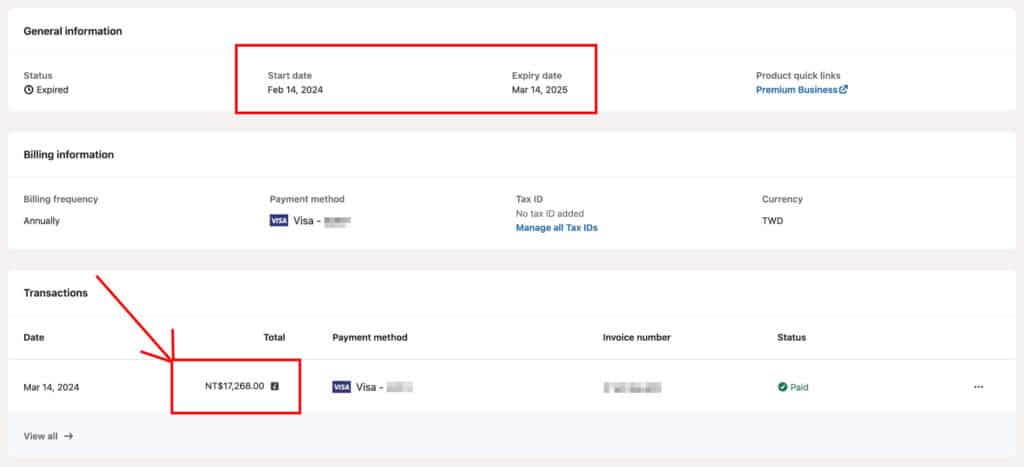
But the full price really isn’t cheap… For Premium Business (15 InMail credits), even with annual billing it comes to more than NT$17,000 a year (NT$1,439 a month on average), which can make anyone hesitate. I bought it once last year myself for NT$17,268 (Feb 14, 2024 – Mar 14, 2025).
60%-off LinkedIn Premium group buy!
A friend recommended this 60%-off LinkedIn Premium group buy, and I joined Kevin Wu’s LinkedIn Premium group buy right away!
Here’s the group buy Kevin Wu runs (Kevin’s official LINE account). It offers LinkedIn Premium (Business) for one year, three months or six months.
* Some readers abroad told me they can’t use LINE, so here are Kevin Wu’s group-buy website, WhatsApp and email ([email protected]) so you can contact him directly
Kevin offers the subscription through LinkedIn’s “gift card” option. The gift card link he sends looks like this: https://www.linkedin.com/premium/redeem/gift?_ed=XXX
The link is an official LinkedIn activation link, so:
✅ You upgrade your own existing account, with no need to share your account or password
✅ There are no regional or feature restrictions, and every Premium feature works normally
✅ You get LinkedIn’s official activation link, which is secure, works worldwide and is more trustworthy
✅ A year costs less than NT$7,000, about 40% of the original price!
Kevin’s LinkedIn group-buy FAQ and purchase steps are here for reference: https://kevin-wu.org/shop/linkedin-premium/
Group-buy price vs. full price
Taking LinkedIn Premium Business (15 InMail credits) as the example:
| Plan | Premium (Career) | Premium (Business) | Sales Navigator Advanced | ||
|---|---|---|---|---|---|
| Membership length | 1 year | 3 months | 6 months | 1 year | 1 month |
| Full price (TWD) | NT$7,188 | NT$5,397 | NT$10,794 | NT$17,268 | NT$4,179.99 |
| Group-buy price (TWD) | NT$6,980 | NT$2,450 | NT$4,650 | NT$6,980 | NT$1,798 |
| Discount | * Upgrade to Premium (Business) for less There’s currently no Premium (Career) group buy, but you can upgrade to Premium (Business) for less than the official price and get more features and benefits! | 55% off | 57% off | 60% off | 57% off |
| Benefits comparison | – | – | – | – | – |
| Premium plan | Premium Career | Premium Business | Premium Business | Premium Business | Sales Navigator |
| Unlimited LinkedIn Learning access | ✓ | ✓ | ✓ | ✓ | ✓ |
| Private mode browsing | ✓ | ✓ | ✓ | ✓ | ✓ |
| Applicant insights | ✓ | ✓ | ✓ | ✓ | ✓ |
| Direct messaging | ✓ | ✓ | ✓ | ✓ | ✓ |
| Who viewed your profile | ✓ | ✓ | ✓ | ✓ | ✓ |
| “Who viewed your profile” history | 365 days | 365 days | 365 days | 365 days | 365 days |
| InMail credits | 5 | 15 | 15 | 15 | 50 |
| AI tools | ✓ | ✓ | ✓ | ✓ | ✓ |
| Custom button | ✓ | ✓ | ✓ | ✓ | |
| Company insights | ✓ | ✓ | ✓ | ✓ | |
| Premium service page features | ✓ | ✓ | ✓ | ||
| Top choice jobs | ✓ | ✓ | ✓ | ✓ | |
| Advanced search | ✓ | ||||
| Dedicated sales interface | ✓ | ||||
| Custom lead and account lists | ✓ | ||||
| Lead recommendations and saved leads | ✓ | ||||
| Real-time updates and alerts | ✓ | ||||
Official LinkedIn Premium pricing (Taiwan as an example)
- Premium Career: $7,188 per year
- Premium Business: $17,268 per year
- Sales Navigator Core: NT$2,395 per month
- Sales Navigator Advanced: NT$4,180 per month
Kevin’s LinkedIn Premium group buy offers 60% off, which cuts the normally high subscription cost a lot. Here’s a quick comparison of the group-buy and full prices:
- If you need it for your own job search, choose Premium Business in Kevin’s group buy. The group-buy price is about NT$6,980, so for less than the Career plan’s full price of $7,188 you get the Business plan’s extra benefits and more InMail credits (from 5 to 15 a month).
- If you work in B2B sales, are a headhunter, or need more InMail credits, you can subscribe to Sales Navigator Advanced through Kevin’s group buy for just $1,798 a month (full price NT$4,180 a month). That means upgrading straight to Sales Navigator Advanced for less than Sales Navigator Core (NT$2,395 a month)! There are even one-year versions of Sales Navigator Core, Recruiter Lite and more!
In short, through Kevin’s LinkedIn Premium group buy, students, job seekers, working professionals, salespeople, HR and headhunters can all get LinkedIn’s advanced features, which normally cost a steep monthly fee, for less than 40% of the price, and work far more efficiently and competitively in their careers.
Comparing the 60%-off LinkedIn Premium group-buy plans
Kevin’s LinkedIn group buy currently offers 4 options:
- LinkedIn Premium Business | 3 months: good for short-term use while changing jobs
- LinkedIn Premium Business | 6 months
- LinkedIn Premium Business | 1 year: best value and the biggest discount (this is the one I chose)
The “1 year” Premium Business plan is 60% off at NT$6,980, even cheaper than the NT$7,188 Premium (Career) plan on LinkedIn’s website!
⚠️ The 1-year group buy is nearly full and spots are limited, so I suggest messaging Kevin first (Kevin’s official LINE account)
Premium Business comes in “3 months,” “6 months” and “1 year” versions. They differ only in length and discount; the plan and benefits are the same:
- “3 months” 55% off price: NT$2,450 (full price NT$5,397)
- “6 months” 57% off price: NT$4,650 (full price NT$10,794)
- “1 year” 60% off price: NT$6,980 (full price NT$17,268)
If you work in sales, are a headhunter, in HR or a founder, and need to send InMail more often, Kevin also offers the group buys below, with 50 InMail credits and more professional features:
- Sales Navigator Advanced | 1 month
- Sales Navigator Core | 1 year
- Recruiter Lite | 1 year
How I activated it (my actual steps)
I bought the 1-year plan. Here are the steps:
1. Add Kevin Wu’s group-buy LINE account: click here to add it. Other ways to reach him: Kevin Wu’s group-buy website, WhatsApp and email ([email protected])
2. Send a message saying “I’d like to buy LinkedIn Premium.” Kevin will reply with whether he still has stock and how to pay
3. About 15 minutes after you pay, he’ll send you an official activation link (in the format below):
https://www.linkedin.com/premium/redeem/gift?_ed=XXXXXXX
4. While logged in to your LinkedIn account, click the Premium gift card activation link and the system activates Premium!
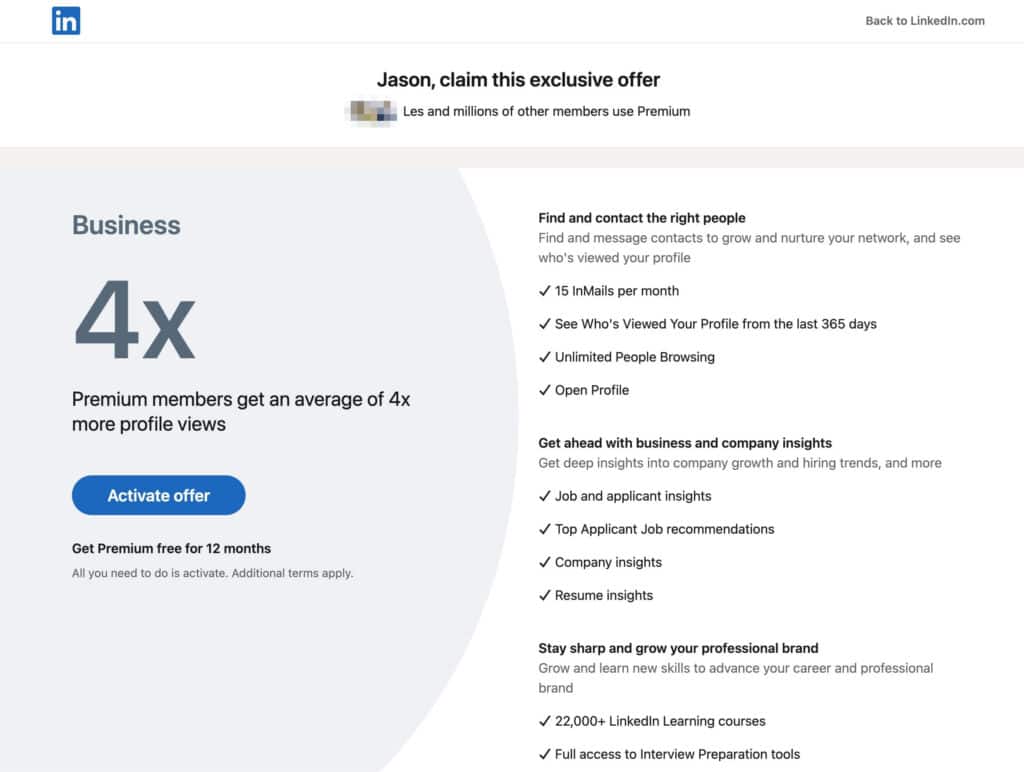
After you click the activation link, you’ll see a page that says: “Jason, claim this exclusive offer“
Click the blue Activate Offer button on the left, and you’re done!
After purchasing, you can also check your membership expiry date and your Premium Business level in your LinkedIn account settings (https://www.linkedin.com/manage/purchases-payments/purchases/).
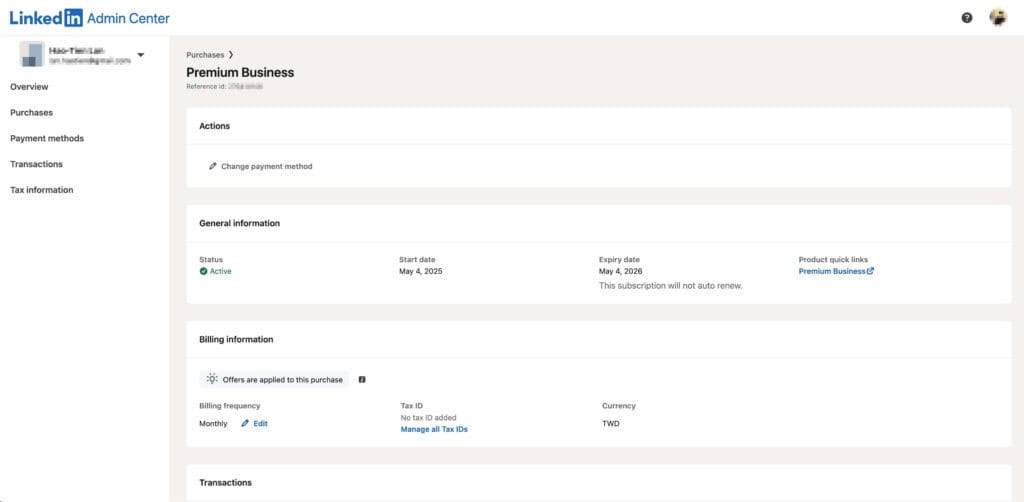
The whole process took me 3 minutes. My account switched to Premium Business right away, the gold Premium badge appeared on my Profile Page, and InMail, Who viewed your profile and LinkedIn Learning courses were all available.
Why I’m happy to recommend it
It worked smoothly for me (the group-buy process was quick and easy), it’s cheap (at 40% of the price, the money for one full-price year gets me more than 2 years of membership), and it’s reliable (the gift card link is an official LinkedIn URL). That’s why I think it’s well worth recommending!
If you’re preparing to job hunt, change jobs or study abroad, or you use LinkedIn regularly to keep up your network, set up Coffee Chats, follow industry news, or take LinkedIn Learning courses, this group-buy deal is worth considering.
Compared with paying $17,000+ a year for Premium Business at full price, the 60%-off group buy is a great deal. Even if you only needed Premium Career (say, 5 InMail credits a month), the group buy gets you Premium Business benefits for less (3 times the InMail, 15 credits a month)!
LinkedIn Premium benefits
The plan in this group buy is Premium Business! It comes with 15 InMail credits and a fuller set of benefits, and it suits personal accounts (not headhunters or HR) best.
The “1 year” Premium Business plan is 60% off at NT$6,980, cheaper than the NT$7,188 Premium (Career) plan on LinkedIn’s website!
Premium (Career) gives you only 5 InMail credits a month. Premium Business gives you 15 a month and adds a custom button, company insights, Premium service page features and more.
Joining Kevin’s group buy means upgrading straight to the higher Premium Business plan for less than Premium (Career) costs!
| Premium plan | Premium Career | Premium Business | Sales Navigator Core | Recruiter Lite |
|---|---|---|---|---|
| Unlimited LinkedIn Learning access | ✓ | ✓ | ✓ | ✓ |
| Private mode browsing | ✓ | ✓ | ✓ | ✓ |
| Applicant insights | ✓ | ✓ | ✓ | ✓ |
| Direct messaging | ✓ | ✓ | ✓ | ✓ |
| Who viewed your profile | ✓ | ✓ | ✓ | ✓ |
| “Who viewed your profile” history | 365 days | 365 days | 365 days | 365 days |
| InMail credits | 5 | 15 | 50 | 30 |
| AI tools | ✓ | ✓ | ✓ | ✓ |
| Custom button | ✓ | ✓ | ✓ | |
| Company insights | ✓ | ✓ | ✓ | |
| Premium service page features | ✓ | |||
| Top choice jobs | ✓ | ✓ | ||
| Advanced search | ✓ | ✓ | ||
| Dedicated sales interface | ✓ | |||
| Custom lead and account lists | ✓ | |||
| Lead recommendations and saved leads | ✓ | |||
| Real-time updates and alerts | ✓ | |||
| Interface built for recruiting | ✓ | |||
| Automatic candidate tracking | ✓ | |||
| Integrated hiring | ✓ | |||
| Smart suggestions | ✓ |
Source for the table above:
https://www.linkedin.com/help/linkedin/answer/a545596?lang=zh-TW
LinkedIn InMail vs. adding a note to a connection request
You may be wondering what InMail actually is. Why not just add a note when you send a connection request?
First, LinkedIn messaging works differently from other social platforms (Facebook, Instagram…). On LinkedIn, you can only message someone if you’re already connected or if you use InMail, so LinkedIn InMail greatly increases the chance that the other person sees your message!
Here’s a clearer comparison:
✅ 1. InMail (requires Premium)
- What it does: lets you message people who aren’t your connections (not 1st-degree)
- Access: you need LinkedIn Premium to get credits (15 a month on Business, 5 a month on Career)
- Who you can message: people who have never connected with you at all
- Format: messages can be longer, with paragraphs and full formatting
- Reply rate: if your InMail is clear and offers value, the reply rate is noticeably higher than for a note on a connection request.
Further reading: The LinkedIn message that helped me land a Google offer: how to contact strangers, and what I learned from LinkedIn Coffee Chats
✅ 2. Connection request + note (free)
- What it does: after clicking “Connect,” you can add a note of up to 300 characters
- Who you can message: only accounts that accept invitations (some people only allow 2nd-degree connections)
- Limits: the note appears only once, with the invitation. You can’t keep the conversation going, and formatting is basic
- Risk: if the person doesn’t accept your invitation, you can’t contact them again
From my own experience on LinkedIn, InMail gets a much higher reply rate. An InMail lands directly in the other person’s chat window and triggers a notification. With “connection request + note,” they don’t get a message notification, only a connection request.
Also, the strangers we want to reach out to usually get lots of connection requests already. If you use option 2, “connection request + note,” yours can easily become one more in the pile.
🧠 Summary: which is better? InMail vs. a connection request with a note
| Situation | Recommended option |
| You want to make sure the person sees your message (even if they haven’t accepted your connection request) | ✅ InMail (requires Premium) It goes to their main message inbox, which is more reliable than a connection request |
| You want to grow your career network and reach out to HR or alumni (for example, setting up as many Coffee Chats as possible in a short window during recruiting season) | ✅ InMail (requires Premium) You can add a personalized opening, which looks professional and gets more replies |
| You’re not in a hurry to expand your network and don’t need to set up Coffee Chats; you just want to build connections naturally | ✅ A connection request + note works well for building connections casually |
FAQ
The FAQ below is excerpted from information provided by Kevin’s official LINE account. Feel free to contact him directly.
Kevin’s full LinkedIn group-buy FAQ and purchase steps: https://kevin-wu.org/shop/linkedin-premium/
Is the gift card region-locked? Can I join the LinkedIn Premium gift card group buy from outside Taiwan?
There are no regional restrictions! The gift card is an official LinkedIn link and works worldwide
Many readers working or studying abroad have already told me they activated it successfully!
What happens when the membership expires?
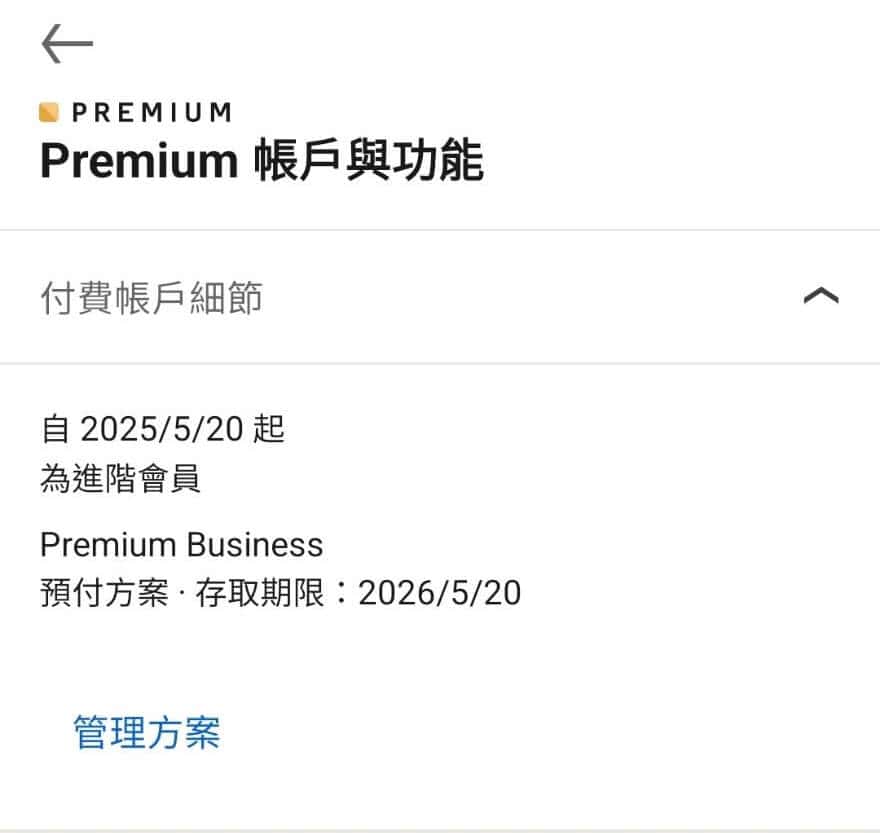
A group-buy Premium membership ends automatically when it expires. It does not auto-renew.
As the image below shows, a group-buy membership is a “prepaid plan,” so you don’t need to add a credit card to LinkedIn, and it ends automatically when it expires. To renew, contact Kevin again and join another group buy.
Jason’s Takeaway
I treat the Premium fee as an investment. A few thousand a year gets me an easier way to reach strangers and set up Coffee Chats.
Jason, who planned his career backward from the goal and landed a Google offer at 24
Next step: If you only need it for a short stretch while changing jobs, start with the 3-month plan; if you want to build your network long term, the 1-year plan is the best value.
