
🚀 Career Growth, 💼 LinkedIn
Build a Professional LinkedIn Profile in 6 Steps So HR Contacts You
Updated 2026/10/16
Jason’s Memo
A well-organized LinkedIn profile can get HR to reach out to you. Work through it in this order:
- Prep: turn off “Share profile updates with your network” first, then change your URL to your English name.
- First impression: put your job title and expertise in the headline, use a clear photo of you smiling, and pick a background image that represents you.
- Content: write the About section in the first person as an elevator pitch, and list quantified achievements under Experience instead of pasting job descriptions.
“A professional-looking LinkedIn profile actually got HR to invite me to an interview?!”
A professional profile gives people one more way to get to know you. It helps with job hunting and networking, it can improve your chances when applying to MBA programs abroad, and HR may even contact you first!
In this post I want to share how LinkedIn helped me with networking and with my Columbia MBA application. When I applied to MBA and other master’s programs, some schools had a field for the applicant’s LinkedIn URL. Whether you add your LinkedIn URL to your resume yourself, or a company’s HR team or a university admissions officer looks you up, using LinkedIn properly and professionally gives you one more chance to show your personal brand.
LinkedIn leans toward being a professional social network, so building a professional personal brand there, one that shows your experience, values and interests, really matters!
Before You Start
Turn Off Profile Update Notifications
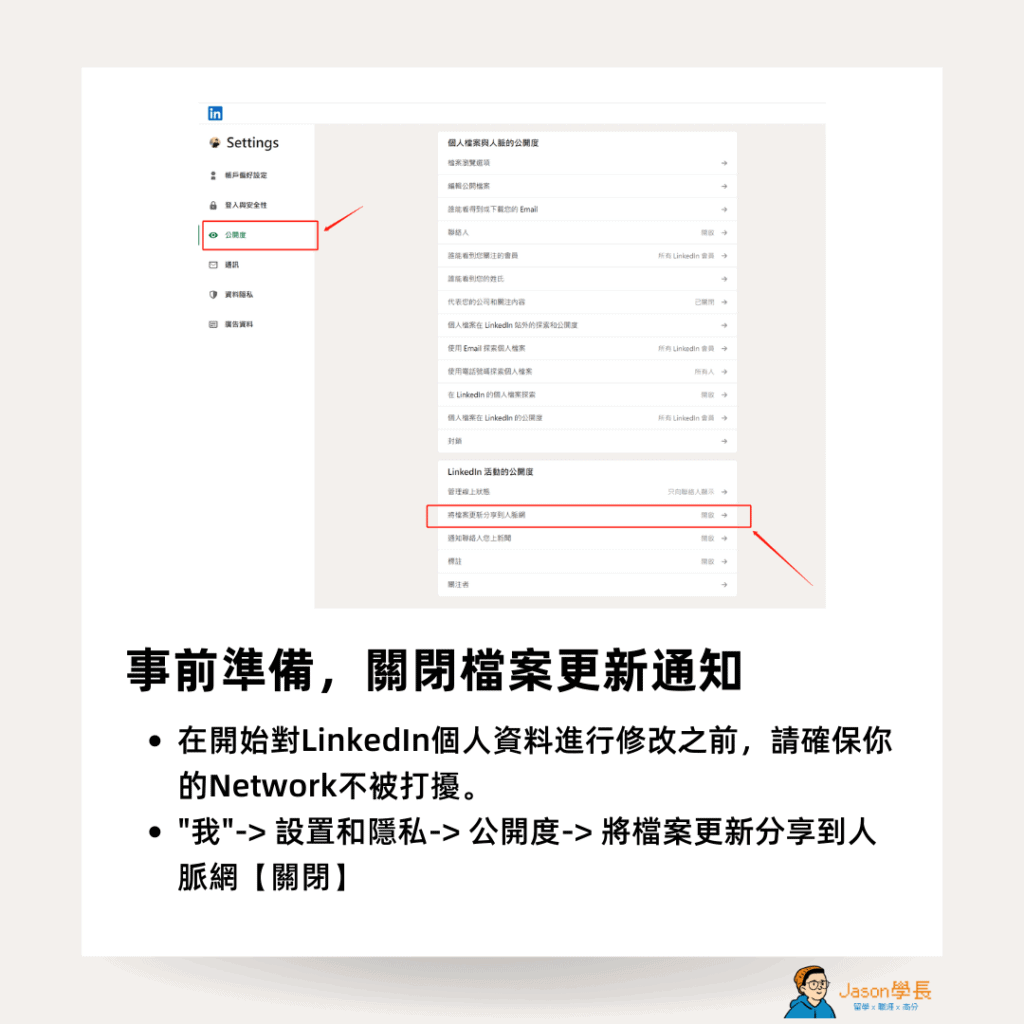
Before you start editing your LinkedIn profile, make sure your connections won’t be disturbed.
- Click “Me”
- Settings & Privacy
- Visibility
- Set “Share profile updates with your network” to “Off”
Set a Custom URL
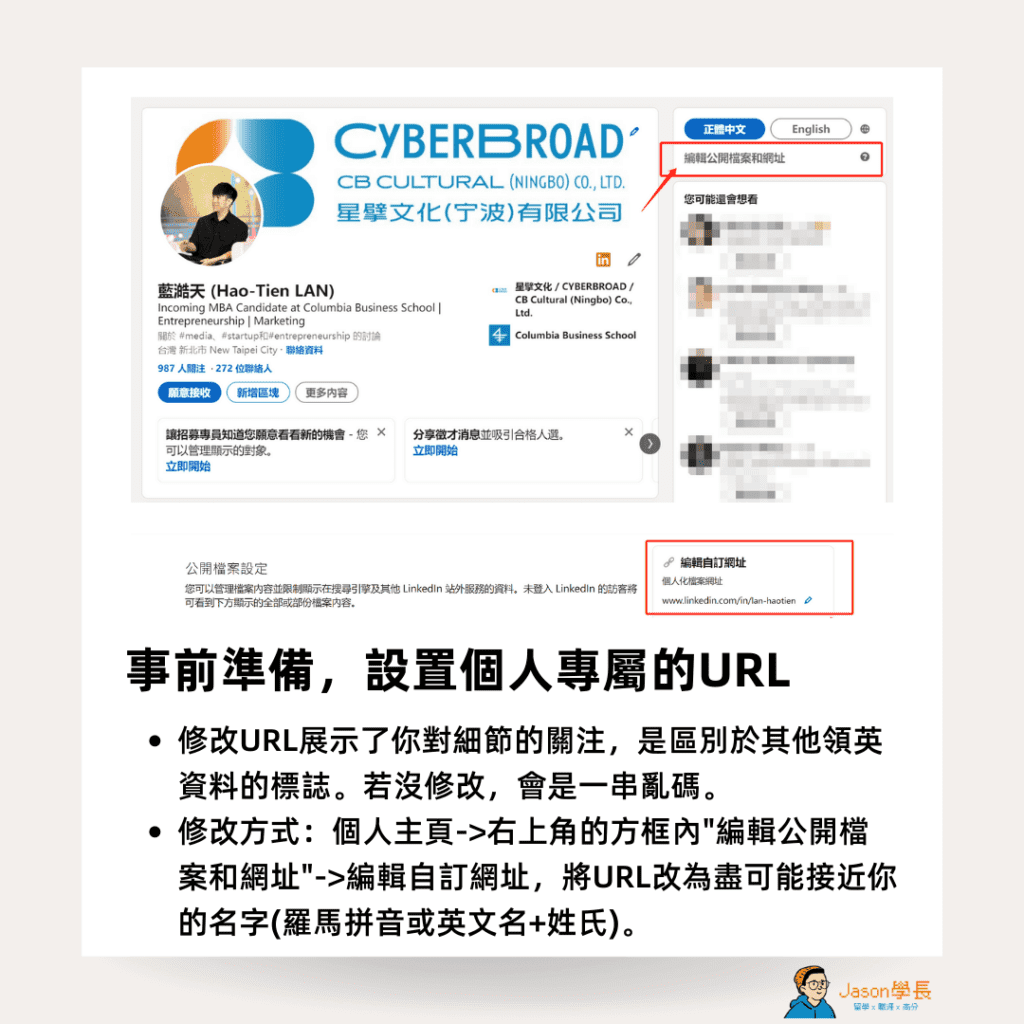
LinkedIn lets you change your profile URL. Doing it shows attention to detail and sets you apart from other profiles and candidates. If you don’t change it, the default is a random string of letters and numbers.
This one matters a lot! I often see people put an unedited LinkedIn link on their resume. That string of random characters at the end is distracting and makes you look a little careless.
How to change it:
- Go to your profile
- Click “Edit public profile & URL” in the box at the top right
- Edit your custom URL and make it as close to your name as possible (romanized name, or English first name + last name)
Feel free to connect with me on LinkedIn (https://www.linkedin.com/in/j-lan). You can also use my profile as an example when you edit yours!
Get to Work: Revamp Your LinkedIn Profile
Write an Engaging Headline and Summary
Why does it matter? The headline and summary are the first things HR and other users see, and they decide whether people keep reading your profile.
How to do it
- Headline: besides your job title, add your expertise and value, for example: “Data Analyst | Python, SQL | Focused on Business Insights”.
- Summary: in 2-3 short, clear paragraphs, outline your professional background, achievements and future goals. Telling it as a story makes it more engaging to read.
Sample summary:
I am a data analyst with 5 years of experience, using data to solve business problems and help companies grow revenue. I am proficient in Python and SQL, and over the past year I completed 3 efficiency projects that cut the company’s operating costs by 20%. I now want to help more companies grow through data-driven insights.
A Professional Profile Photo
LinkedIn is a professional platform, so your profile needs a professional headshot, not a group photo or a casual snapshot. Personally, I’d also avoid ID photos (like the one on your ID card or passport); they look a bit out of place. According to some not-very-reliable data online, profiles with a photo get viewed dozens of times more often than profiles without one. Below are my “Do’s” and “Don’ts” for LinkedIn photos.
My top recommendation: just you (only YOU), smiling, in a clear, recent photo with a simple background.
A more advanced tip: try to match the style of your industry and dress the way you usually do at work.
| ⭕ Do’s | ❌ Don’ts |
| Close-up shot Business attire Recent photo Hire a professional photographer (optional) | Selfies Group photos Outdated photos Other people / animals / cartoons / avatars Strange backgrounds |
Background Image / Banner
Choose an image that represents you best. Common choices include photos of you giving a talk, volunteering or at club activities. You can also use Canva to design a solid-color background that shows your strengths and field.
In short, first impressions count! A professional headshot makes you look trustworthy, and the background photo is a great place to show your personal brand:
- Headshot: pick a clear, natural photo of you smiling, with a simple, clean background. Wear clothes that fit your professional image.
- Background photo: choose an image related to your industry or field, such as a company event or a technical illustration, or design one with your personal tagline.
Note: avoid heavily edited photos and selfies. They can come across as unprofessional.
About (Your Introduction)
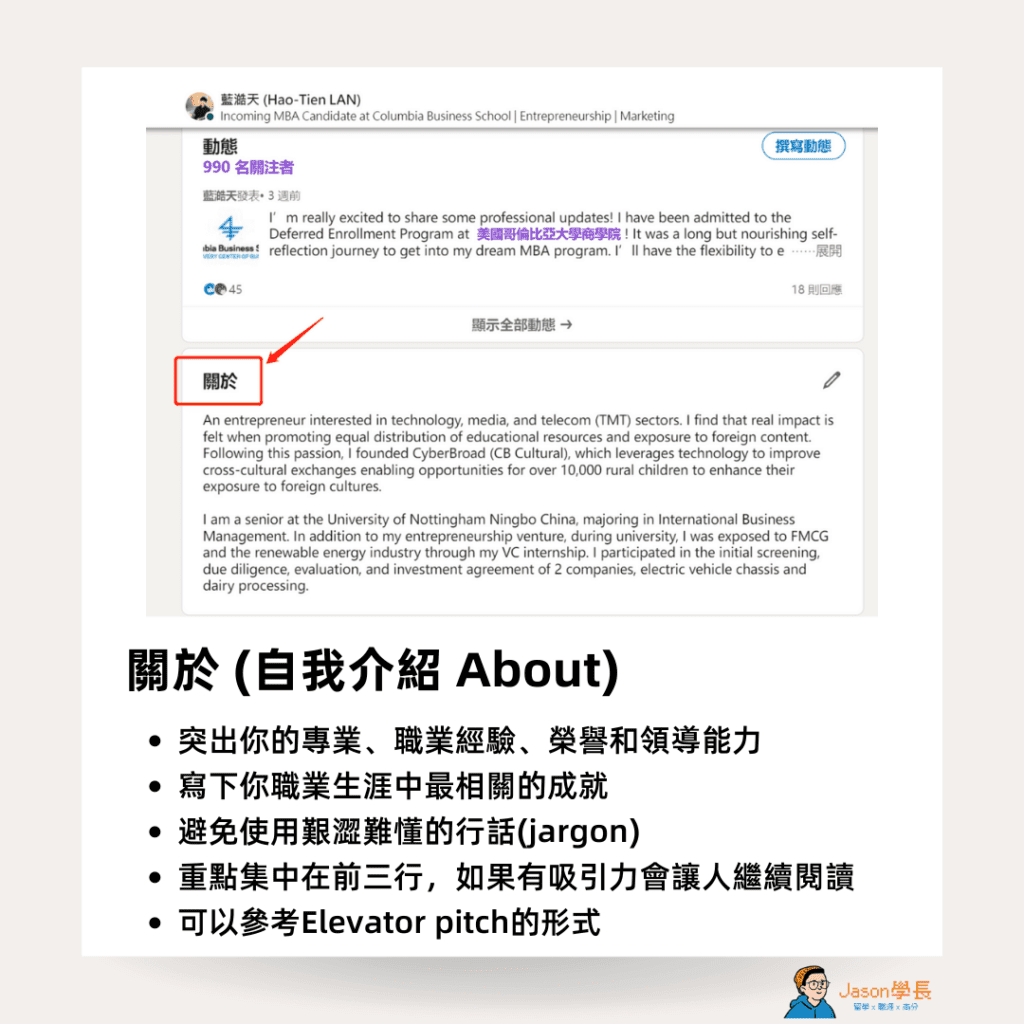
Write an introduction people will remember. Highlight your expertise, work experience, honors and leadership. List the most relevant achievements of your career and avoid hard-to-follow jargon. Put the key points in the first few lines. You can model it on an elevator pitch, written in the first person: your traits, passions, values, near-term goals, and how your background made you who you are today.
Note: don’t mix up About and Experience. About is a summary; the Experience section should go into more detail.
Experience
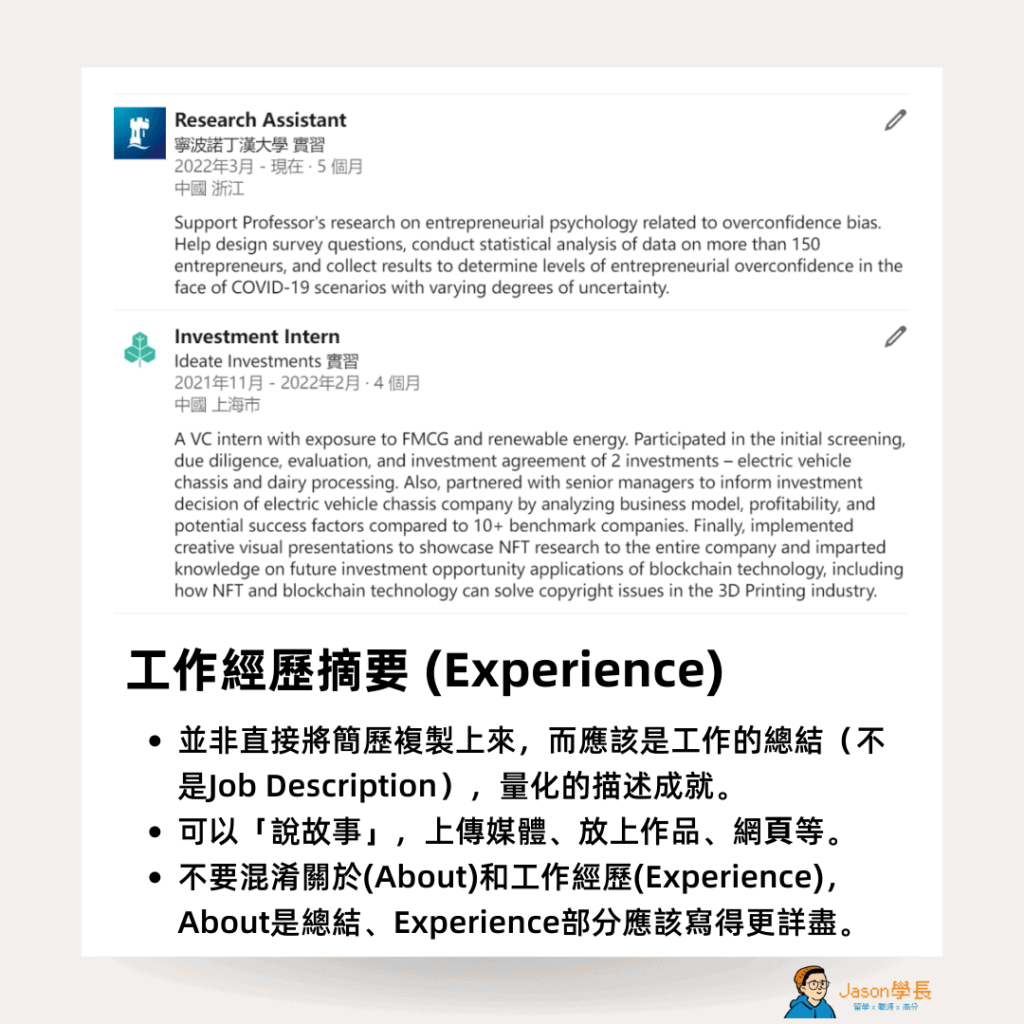
This section isn’t a place to paste your resume, and it isn’t a job description either. It should summarize your work and describe your achievements in numbers. You only need to cover the most important parts of each job, but you don’t have to limit yourself to a few bullet points like on a resume. Consider telling it as a story or writing a short paragraph, and you can even upload media, add samples of your work or link to web pages.
Education
List your school, department, ranking and GPA (I’d include it if it’s above 3.5), and you can add courses you took. You can also describe your research (such as your thesis or a research project) and the clubs you were part of in college.
Licenses & Certifications
Only list the ones closely related to your target field. Too many unrelated items and the section loses focus.
Volunteering
Adding community service shows people what you contribute outside your professional work.
Featured
LinkedIn’s Featured section gives you space to show yourself off. You can put work achievements and results here, or pin articles you’ve posted before. A profile that is all text looks flat; adding some featured media makes you come across as a fuller person.
Become a LinkedIn Pro: Advanced Tips
Here are some more advanced tips to help you get comfortable with LinkedIn and get more exposure.
Personalize Your Invitation Messages
As you keep building connections, send more personal invitation messages that mention shared interests, events or schools you have in common, or mutual friends. Invitations with the default message don’t get accepted very often, and the other person has to click into your profile and try to remember whether they know you.
Say hello, introduce yourself and explain why you’re reaching out. Open up about yourself first, and others will be more willing to open up too!
For more on how to ask people for a coffee chat, see this article 👉🏻 100+ Coffee Chat Questions for Networking: What to Ask When Job Hunting, Changing Careers or Exploring Your Path
Keep It Updated
When you graduate, land a new job, finish a project or get into a school, post about it to share the good news, along with what you learned and your thanks. Remember to update your experience and other sections regularly, too. LinkedIn posts are another way to grow your influence and show people the fields you care about. Posting meaningful content highlights your expertise and interests and helps you build a network of people with similar interests and ideas.
Share Professional Content, Reflections and Workplace Lessons to Build Your Personal Brand
Sharing valuable content shows your professional skills and gets your profile seen more often.
- Share articles: give your take on industry trends, case studies or workplace skills.
- Write articles: publish your professional insights, for example “How to use data to drive business growth”.
- Join discussions: leave thoughtful comments on other people’s articles or posts to raise your visibility.
Note: keep your content professional and relevant, and don’t post personal content too often.
Title
Use your title to highlight your current role and company (for example: COO at Company CB), your expertise or awards, or your skills (for example: analyst, lecturer, consultant).
Location and Industry
These two simple settings help more people find you and help you find more relevant potential connections.
Add New Sections
LinkedIn lets you add many sections, such as volunteering, languages, honors and awards, patents and publications.
Consistency
A LinkedIn profile that is consistent and has depth throughout makes it easier for people to get to know you. Watch your language, too: LinkedIn lets you edit a Chinese and an English profile side by side, so when you edit the English one, check that fields like company names have also been changed to English.
When you connect with people on LinkedIn, take a look at this article 👉🏻 How One LinkedIn Message Got Me an Offer at a Multinational: Reaching Out to Strangers for a LinkedIn Coffee Chat
How Do You Turn These Tips into Your Own Profile?
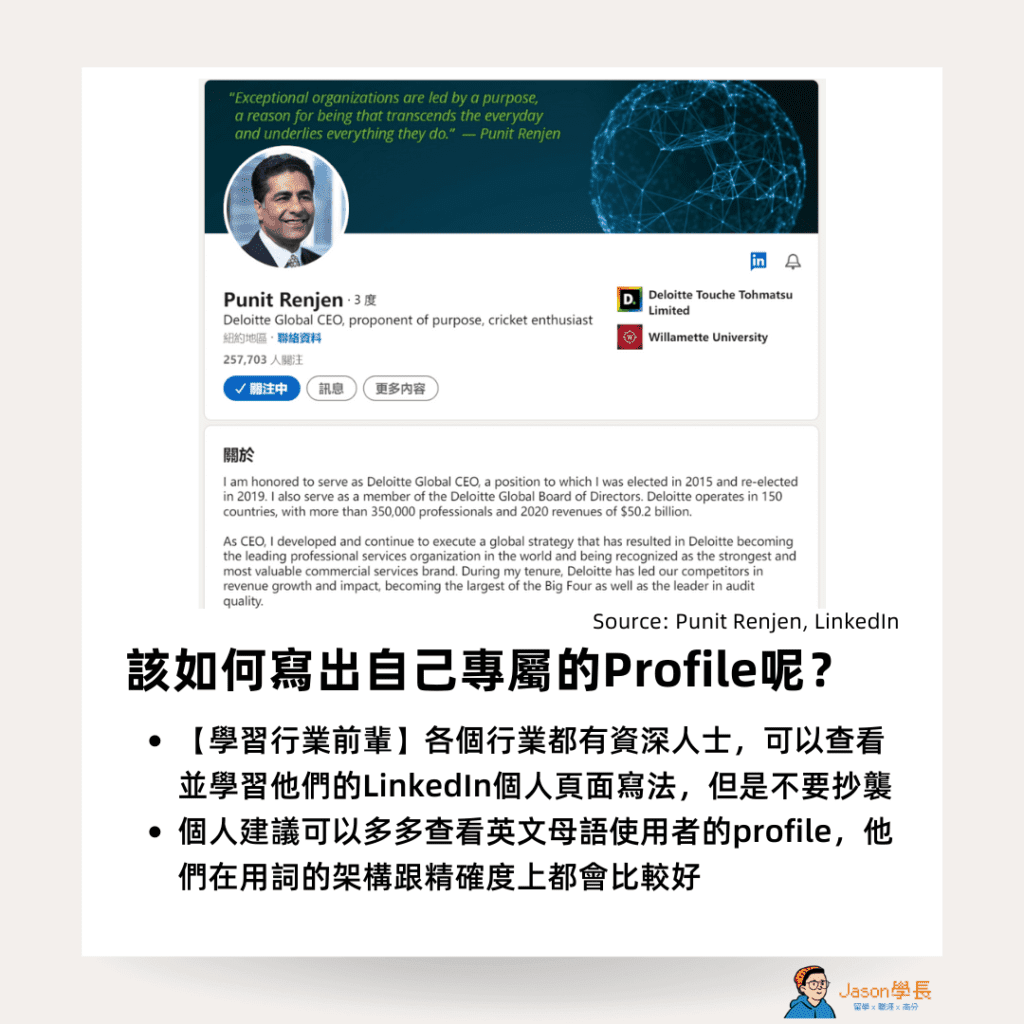
Learn from Senior People in Your Industry
Every industry has senior people. Look at how they write their LinkedIn profiles and learn from them, but don’t copy. I’d suggest looking at plenty of profiles by native English speakers, since their wording tends to be better structured and more precise.
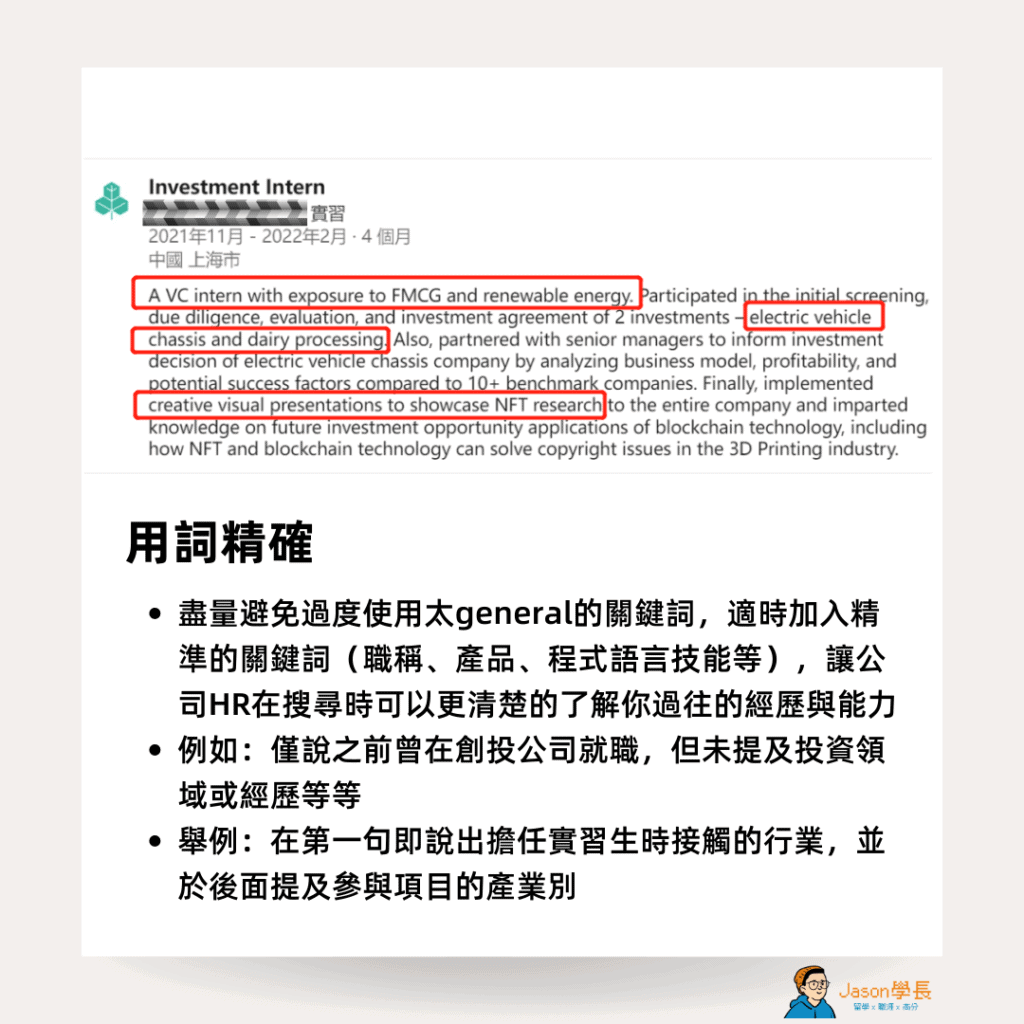
Use Precise Wording
Avoid leaning on overly general keywords. Add precise ones where they fit (job titles, products, programming skills and so on) so HR can see your experience and abilities more clearly when they search.
Avoid Advertising
When you post, avoid long descriptions of your company’s products or business. From a Western perspective, posting that kind of advertising from a personal profile is inappropriate. Instead, get specific about your industry experience, professional skills and the projects you’ve worked on to come across as more professional, or share what you’ve learned and what you think.
Final Thoughts
A good LinkedIn profile can take you a long way. Once you get through resume screening, read this article to learn more about what questions to ask your interviewer! If you’re a new graduate without much work experience, you can fill out your LinkedIn profile with your education, internships, certifications, volunteering and other sections.
Writing a good About section and Experience section is a process of self-reflection. Once you’ve done it, introducing yourself in job applications and interviews gets a lot easier and has more to say!
Jason’s Takeaway
Writing your About and Experience sections well is an exercise in self-reflection. After that, your self-introduction in job applications and interviews will have more substance.
Jason, admitted to Columbia Business School’s MBA at 22 and founder of OfferLand.cc
Next step: today, change your LinkedIn URL to your English name, then rewrite your headline.
